For my DX Cluster project, I did not want to build one monolithic service that tries to do everything at once. I wanted a clean architecture with clearly separated responsibilities. That is how the current API setup evolved: spots from different sources are collected centrally, normalized, filtered and then exposed again through several interfaces.
The basic idea behind the setup
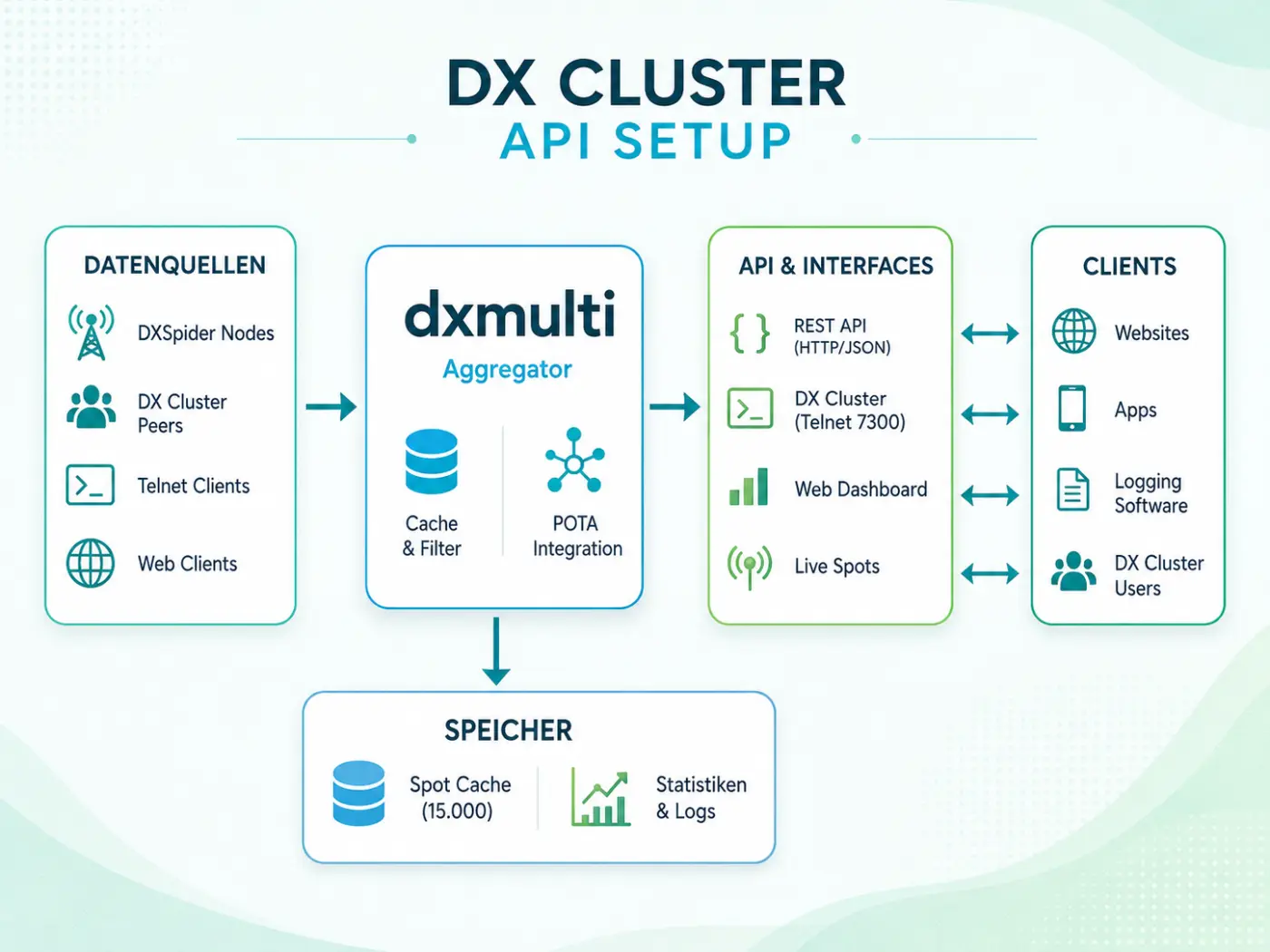
At the center is an aggregator that collects incoming spot data and turns it into one consistent data source for downstream clients. This means that every website, app or logging program does not need to talk to every source directly. Instead, there is one central layer where data arrives, is checked and is then made available again through defined interfaces.
Connected data sources
- DXSpider nodes as classic cluster sources
- DX Cluster peers for additional external feeds
- Telnet clients that submit spots or commands
- Web clients as modern browser-based consumers
This separation keeps the setup flexible. New sources can be added without having to rebuild all downstream clients.
The role of dxmulti
The core of the setup is dxmulti. This is where spots are aggregated, cached and prepared for other services. It also contains cache and filter logic as well as the POTA integration. Instead of forwarding everything unchecked, data can be structured and passed on in a useful form.
- Cache & filters for structured processing
- POTA integration for portable activity
- Spot cache as the central data source
- Statistics & logs for operation and analysis
API & interfaces
Several output channels are built on top of this central layer. That is what makes the setup practical for me: the same data can be consumed at the same time by traditional radio operators, web applications and other tools.
- REST API for structured HTTP/JSON requests
- DX Cluster via Telnet for classic clients
- Web dashboard for browser-based use
- Live spots for fast, current overviews
Who benefits from it
The client side is intentionally open. Websites, apps, logging software and normal DX Cluster users only connect to the interface they actually need. This keeps the system maintainable and makes later extensions much easier.
Why I like this architecture
Especially in projects that combine amateur radio and IT, clear separation pays off. Data sources, processing, interfaces and clients all have different jobs. Keeping these roles separate makes the system easier to extend, easier to test and much more relaxed to operate in day-to-day use.
Operation, monitoring and troubleshooting
For me, a clean architecture becomes most useful when something does not behave as expected. Monitoring and understandable status data therefore belong to the design just as much as spot processing itself. I want to be able to tell whether a peer is connected, whether new spots are arriving, whether the collector is still moving forward and at which layer an error occurs. Separate services, logs and clearly defined interfaces make that much easier: a problem in the web dashboard does not automatically mean that the DXSpider node or the Telnet service is down as well.
The same separation also makes extensions safer. New statistics or additional data sources can be tested independently before they appear on the public site, which reduces side effects and makes rollbacks much easier. In a DX Cluster environment, I also consider it important not to confuse origin and transport path: an origin node describes where a spot comes from in the wider network, while the direct peer describes the actual ingress path into my own node. That distinction now forms the basis of the peer and origin statistics on DA6IT.de.
Conclusion
For me, this DX Cluster API setup is a good example of how amateur radio and IT can work together in a useful way. It has a clean technical structure, remains flexible for new ideas and provides a solid base for additional features around spot processing, APIs and web applications.